
Agentic Workflows: Branched Environments
Continuing on my agentic workflows exploration, I expand on my previous Supabase implementation of preview environments, and move to Neon for true branching. I get a solid implementation.

Agentic workflows are becoming more and more valid, especially in enterprise. While for personal development, you will mostly get away with tmux+<agent>, in a professional environments, high speed and lack of policy will get you in trouble.
For this practical exploration session, I onboard my project onto Neon and re-create my "Preview Environments” implementation to turn into a truly separated (branched) environment for every new Pull Request (which in itself is generated entirely by an agent). All in Git.
The repositories for this project are here:
Complete example: [kubeden/txtwrite]
Codex & Claude Code skills for your agents to “one-shot” it for you:
Codex: [kubeden/skills/codex]
Claude Code: [kubeden/skills/claude-code]
Note: since this implementation relies heavily on Neon’s (or Databricks’ Lakebase) architecture, the “plug-n-play” repo (2.a., 2.b.) requires your database to be either a Neon DB or a Lakebase DB.
If you enjoy videos, here is the entire content here, but on Youtube!
Why care & what does this solve?
I’ve been thinking a lot about agentic workflows lately. I am a very heavy AI user, and with a great ton of curiosity in the space. Often I can’t help but notice how similar terminal agents and DevOps practices are… it is almost like they were made to be used together. DevOps heavily relies on automation and what better direction to go than to put AI in the very foundation of automation…?
Convenient Interface
One of the great benefits of this system, is that it has a single convenient interface. Be it Git, or Slack, it is a single interface. You can open issues from your phone, get instant notifications in your email on failures, and get both a UI and a CLI for you OR your agent to track every step of what’s happening.
Tracking & Collaboration
With Git specifically, this workflow benefits from various tracking & collaboration possibilities. Multiple people can collaborate on issues & PRs. Reviewing the results. Seeing what works and what doesn’t.. and so on, and so on. Plus, you can always see closed PRs, and if your team follows standards practices i.e. merges small, incremental PRs, you get a very good “disaster recovery system”-like system through Git’s history.
Another great benefit from Github (or any Git provider)’s set of functionalities, is that you can set policies to disallow all kinds of negative actions!
Sandboxed environment
I was thinking a lot about this… you can configure a single VPS and install your agent there, but I am a little concerned how the said "agent dev vm” will not be ephemeral… which, combined with the recent high number of CVEs, is in my opinion, certain trouble. It would be very convenient, though…. So anyway, this particular implementation that I am writing about here, is ephemeral meaning after every CI finishes, the agent machines are destroyed so you don’t have to worry about managing long-lasting environments.
Free… and flexible
Well… it is free. I see people attempting this with external services, and many startups seem to be providing similar experience to their end users, but for I have always believed that for good engineering, you (or your team) need to own your resources. Self-management gives you the most flexibility, and with flexibility, you are only bottlenecked by your imagination (and laziness).
Prerequisite Knowledge
In order to make this article understandable for everyone, I am going to go over the main concepts utilized further.
What is a…?
Preview Environment
Preview environments are such environments, that are an exact replica of your production (or staging) environment, that are being spawned on-the-go. Preview environments are very useful for rapid development, as one can wire all kinds of test flows to trigger as the environment gets created, as well as get any person to start using/testing it immediately. There is no DevOps/Infra person required for this.
Agentic Workflow
There are mixed opinion in the community about what exactly an “agentic workflow” is — is it a split-paned tmux session with multiple terminal agents on display? Is it a Linear-Slack-ClaudeCode integration? Maybe a custom written agent with agents SDK that reacts to a pushover notification? Well… in my opinion, all of these are agentic workflows. I think of the word “workflow” as a set of actions that are combined into a system. And “Agentic” workflows, are a set of actions an AI agent goes through/executes, based on a trigger (and possibly… criteria).
Database Branching
Now… when I first started playing around with the concept of preview environments & AI, I thought I knew what database branching was. Well, I was wrong. You see, I thought that to “branch” a database was just a fancy way to say “make a copy of it.” Turns out… it is a lot more neat! Database branching, when “true” (as in, true branching), becomes practical when the compute and storage layers are separated. This way, at the point of separation (when a new branch is created), new writes are stored as deltas at the storage layer, which allows only the diverged pages to be stored separately and not the entire database. As such, your database is not being fully cloned. Instead, a new logical space of its state is created, where you can safely make changes, and later on have the ability to apply the desired changes back to your real database (through migrations, schema diffs, restore/reset workflows, or application-level data movement, depending on what changed)… essentially materializing only the diverging parts of that logical space.
This technique enables some otherwise hard-to-achieve features:
Setting a TTL on a test branch i.e. automatic cleanup
Fast restore in the case of an accidental delete action / similar
Quick iteration (branching) without interfering with production’s performance
Branching off a development branch without having to deal with the syncing of a separate development instance
The first three paragraphs of this post do a very good job in explaining it: Database Branching in Postgres: Git-Style Workflows with Databricks Lakebase
Architecture
The following is a high-level diagram for how the different system component all depend on and interact with each other. For the deeper, workflows-based diagrams, read further.
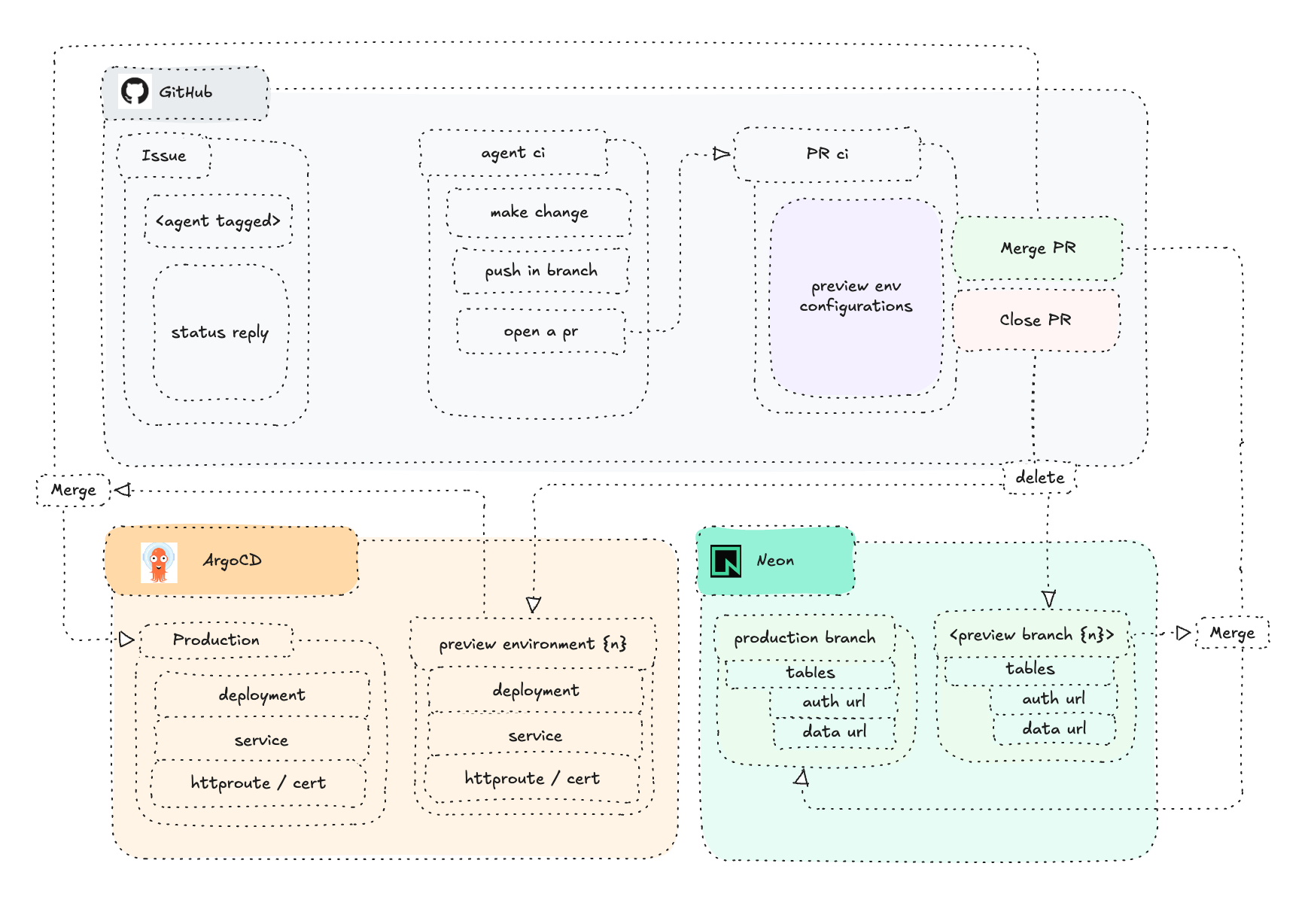
The implementation has 3 core parts:
1/ Github: The agentic workflow “engine”
2/ Application infra (K8s+Neon): The place where my app lives (Frontend-only)
3/ Database infra (Neon): The place where my app becomes dynamic (Backend)
How it works
The foundation is standard: there is a Github repository, which contains a React codebase that holds the frontend for a web-based markdown editor. It uses the /src structure, and uses deno for its runtime environment.
Further, for backend, I use Neon. Mainly for the managed Auth, as well as (obviously) for a database.
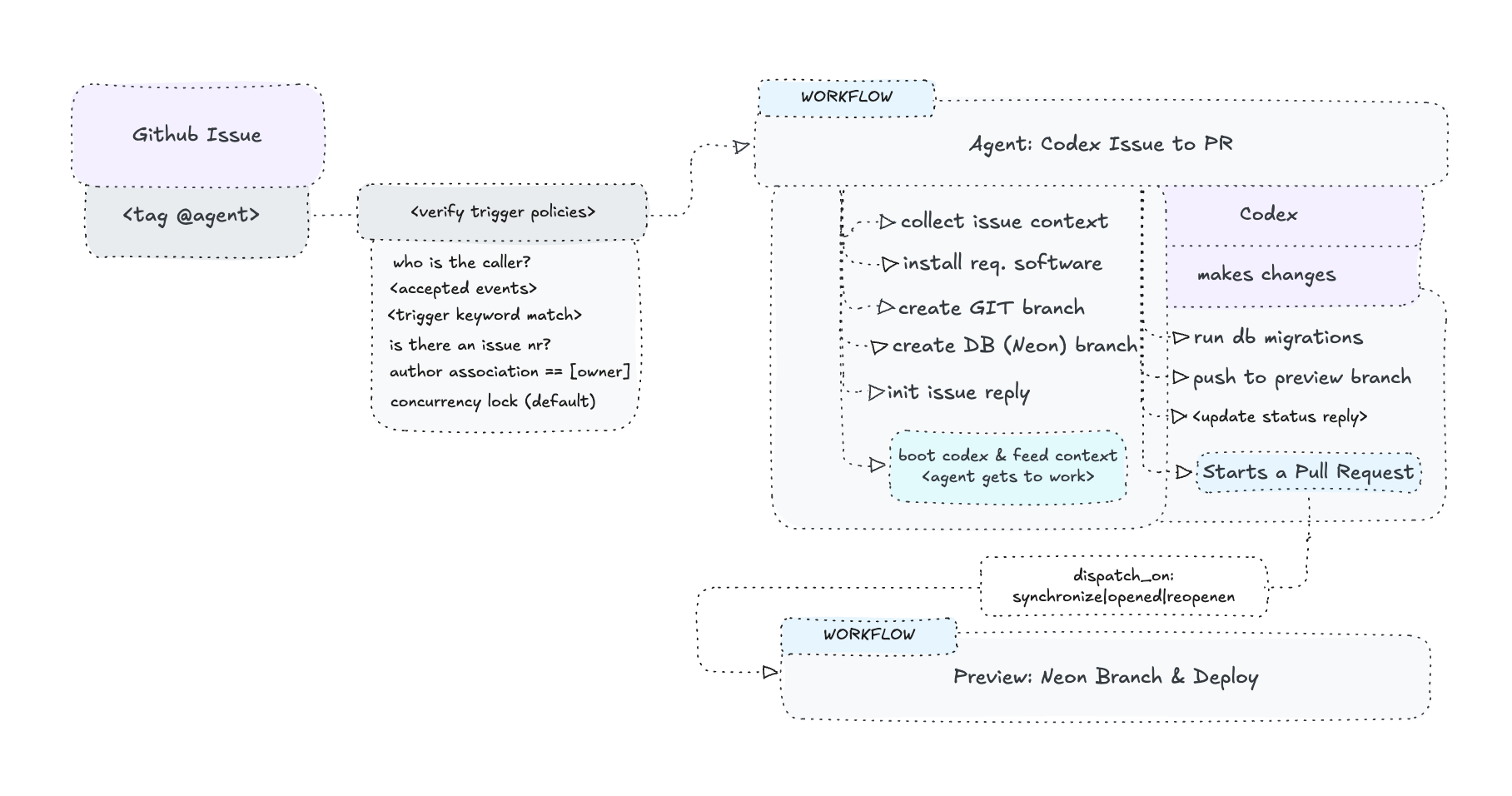
Upon a desired change, I create an Issue and tag my agent <@kubeden-agent>. This triggers the <Agent CI>, which:
Verifies trigger policies
Collect full issue context for the agent
Installs all required software in the runner
Creates (or reuses) the separate GIT branch
Creates a separate Neon preview branch
Boots the agent (Codex) and feeds it the context
Agent implements the code changes
Runs configured checks & migrations against the Neon preview branch
At the point where the agent finishes its work, the workflow:
Commits changes & pushes to the branch
Opens /or updates/ a Pull Request
Updates the status reply in the Issue
Dispatches the preview workflow
At this point, there is a Pull Request opened, which triggers the next major CI <Preview CI>, which goes like this:
Checks out the PR commit
Creates or reuses the Neon preview branch
Runs migrations/checks
Builds a new container image (with the branch-specific Neon URLs for auth, and data) & pushes it to the registry
Updates & pushes the ArgoCD manifests (in the infra repository)
ArgoCD creates a new application through the AplicationSet
Polls the new ApplicationSet app status
Updates the status reply with the preview URL
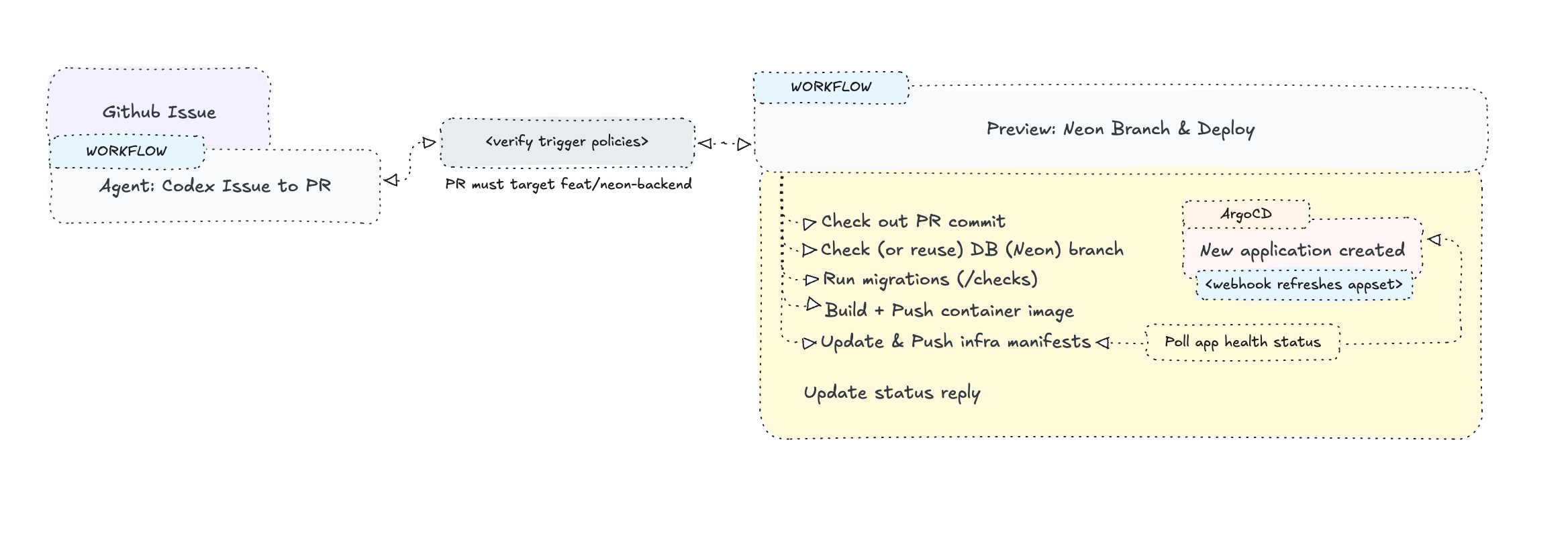
Some details worth mentioning are that Github runs a webhook against my ArgoCD upon the push in my infra repository so that the preview application creation can be immediate.
And in the case where I add a reply to my PR i.e. when I am not satisfied with the initial attempt, it runs the Preview CI again, with the only change that it reuses the already live resources, instead of spawning new ones.
And here is the entire diagram.
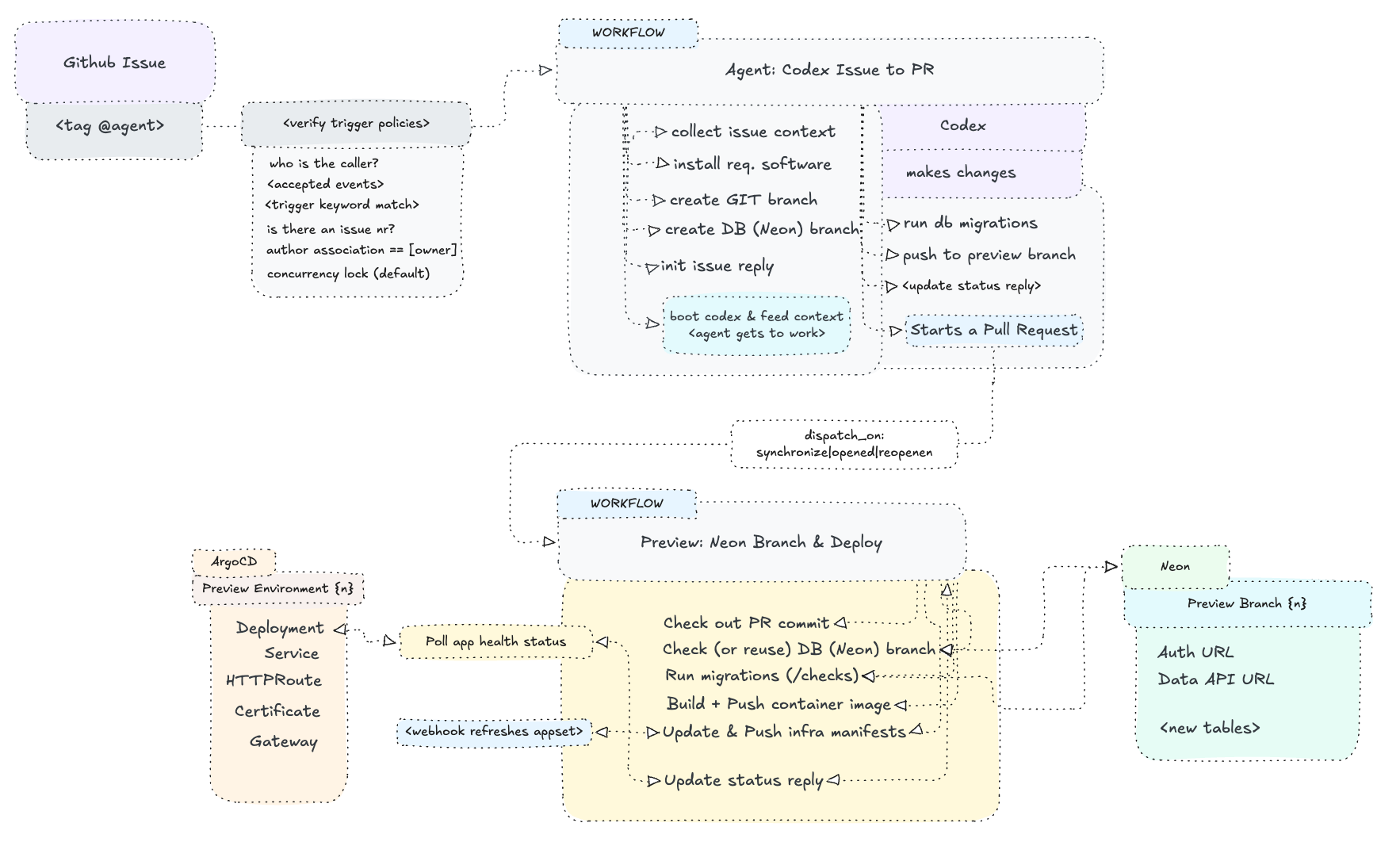
Conclusion
This is the second time I am doing a preview environment-like Github integration. I believe preview environments, as a technique, are the perfect fit to combine with agentic workflows. The reason why I returned to this implementation is that I was left triggered by my previous “workaround” with Supabase, and the table separation felt a little wrong. It was at this point I talked to a friend, with whom I discussed database branching and after a little knowledge transfer, he showed me Neon (and the blog post I linked to in the beginning of this post). I was mainly excited about the technique they use to separate compute from storage, which is exactly what makes true branching possible. Not only, but having the “managed backend” functionality I enjoy so much, with a Git-like iteration, makes me think we can really get into some complex implementations like the recently-viral “product factories”.
I think using AI is obviously required in our current times, but I also think many engineers skip a crucial step in their thinking phase-they forget to combine their pre-AI knowledge with all the new skills and concepts they are passively gaining & being attached to. It’s like many of us separate what worked pre-AI, and what works now, post-AI. Techniques like Preview Environments, GitOps, and major DevOps practices, are honestly only making agentic workflows more powerful.
So… if you are reading this post as a pre-AI engineer, maybe don’t get that excited about how amazing the agents are, and remember who you are-how deep you can think. And when you do, combine your deep thinking & extensive experience WITH the AI agents capabilities. I am sure the results are going to be amazing.
Thank you for reading.
After-post notes
N1: All my posts are written by me.
N2: If this post inspired you to think, feel free to email me and start a discussion! I love talking technology, and even so if you are, too, actively living in “the arena”.
You can find everything about me on denislavgavrilov.com/about
Thank you for reading and have a good one!