The following post is a recap of my Claude Code sessions doing a schema change the careful way. Although the content is AI-generated, I go through the entire post myself and every number in it comes from a run I watched happen. If you'd like to discuss anything in relation to this directly with me, you can do so on [email protected] or on x.com/@kuberdenis.
Splitting a column is the smallest interesting schema change there is. users.name becomes users.first_name and users.last_name, because someone finally wants to write "Hi Ada" in an email.
The one-line version of that change is a rename, a backfill and a deploy, run in whatever order you get to them. It works on your laptop. On a table with two hundred thousand rows and traffic on it, the same three steps give you a stretch of 500s in the middle, and the length of that stretch is however long the slowest of the three took.
The pattern that fixes it is old and has a name: expand and contract. Add the new shape, run both shapes at once for a while, then remove the old one. What is new is that you no longer have to be brave about it. A Neon branch is a full copy of the database in about two seconds, so every step can be run somewhere disposable first, read, and only then pointed at the real thing.
I built the whole thing to see whether "zero downtime" survives being measured. It does. 319,568 requests went through the app while the migration ran, and none of them failed.
Resources
- kubeden/diffium-db, the tool used to read what each rehearsal did
- Neon branching, the copy-on-write branches this leans on
What is running
A small orders API in Bun, two instances of it on two ports, and a proxy in front that only routes to a port whose health check is passing. Behind them, Postgres 18 on Neon with app.users and app.orders, seeded with 200,000 users and 100,000 orders.
The HTTP contract never changes. A user is posted and read back as { name, email } on the first request and on the last one. Only the storage underneath moves. That is the whole trick, and it is why the app can be deployed four times during the change without anything outside noticing.
Two instances behind a proxy is the part people skip in blog posts, and it is the reason the pattern exists. During a rolling deploy, old code and new code are talking to the same database at the same time. Every rule below follows from that one sentence.
The load generator holds 24 clients open and each of them does the same four requests in a loop: create a user, read it back, place an order, list the orders. It counts failures, and it also compares the name that comes out with the name that went in. Counting 200s is not enough. A migration that loses half a name returns 200 all the way down.
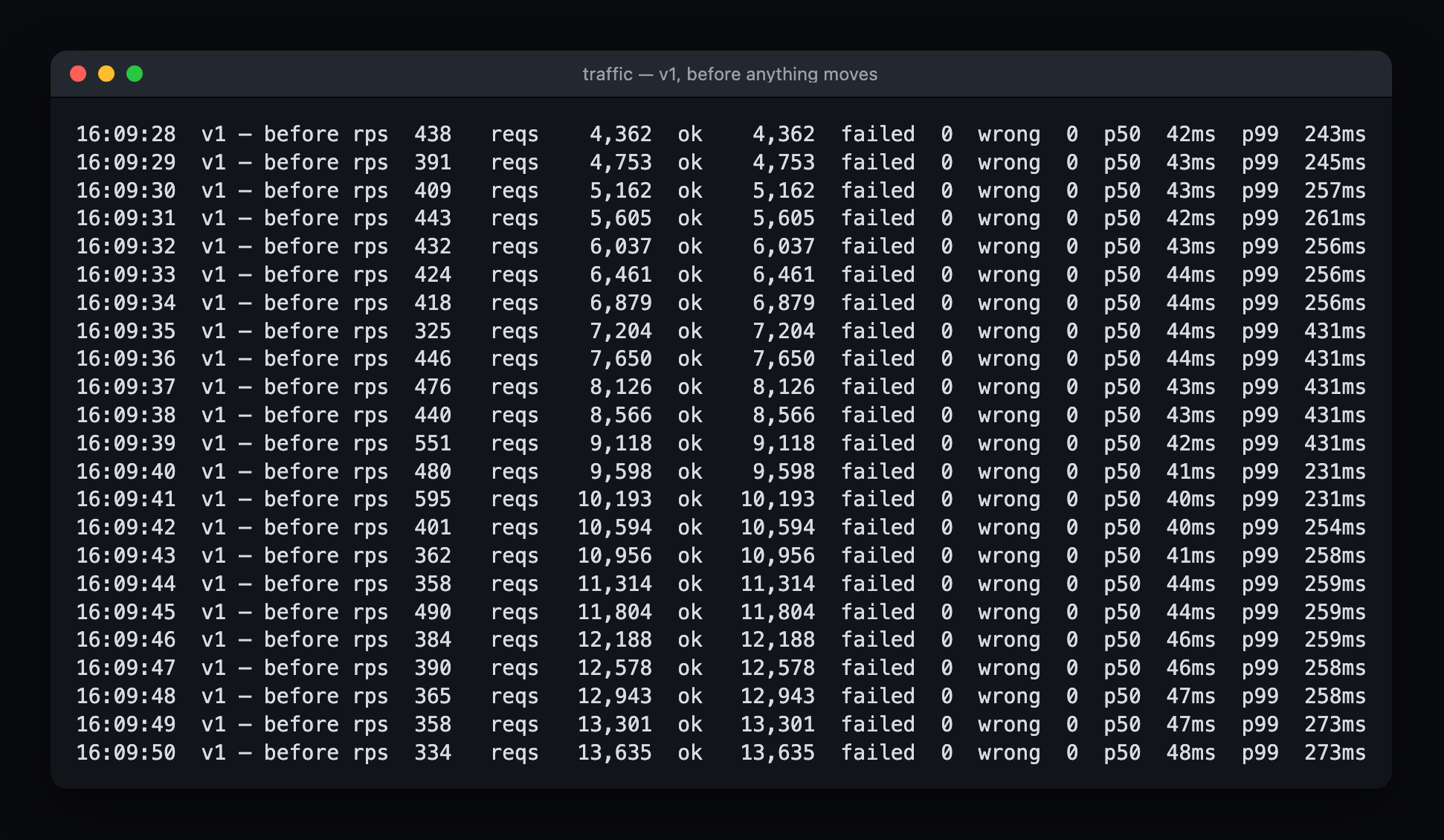
The instrument, before anything moves. wrong is the column that matters.
The order of operations
Six steps, and the order is the whole content of the pattern.
- Expand. Add
first_nameandlast_name, nullable. Add a trigger that keeps them in step withname. - Deploy the dual write. The app now fills both shapes. It still reads
name. - Backfill. Fill the new columns for every row that predates step 1.
- Constrain. Say the new columns are always present, without locking the table to prove it.
- Flip the reads. The app answers from
first_nameandlast_name. - Contract. Deploy an app that never mentions
name, then drop the column.
Each of steps 1, 3, 4 and 6 touches the database. Each of them gets rehearsed on a branch first.
Rehearsing on a branch
Every database phase goes through one script first. It cuts a branch off production, takes a diffium-db baseline on it, applies the phase, prints what changed, and deletes the branch. Without the timing and the tidying, that is four commands:
neonctl branches create --project-id "$NEON_PROJECT_ID" --name "$BRANCH"
URI="$(neonctl connection-string "$BRANCH" --project-id "$NEON_PROJECT_ID")"

DATABASE_URL="$URI" diffium-db snapshot --schema app
psql "$URI" -v ON_ERROR_STOP=1 -f "sql/$PHASE"
DATABASE_URL="$URI" diffium-db diff --schema app
The branch came up in 2.4 seconds holding the same schema and the same 200,000 rows, because it is copy-on-write off its parent rather than a restore. Applying the expand phase to it took 0.7 seconds.
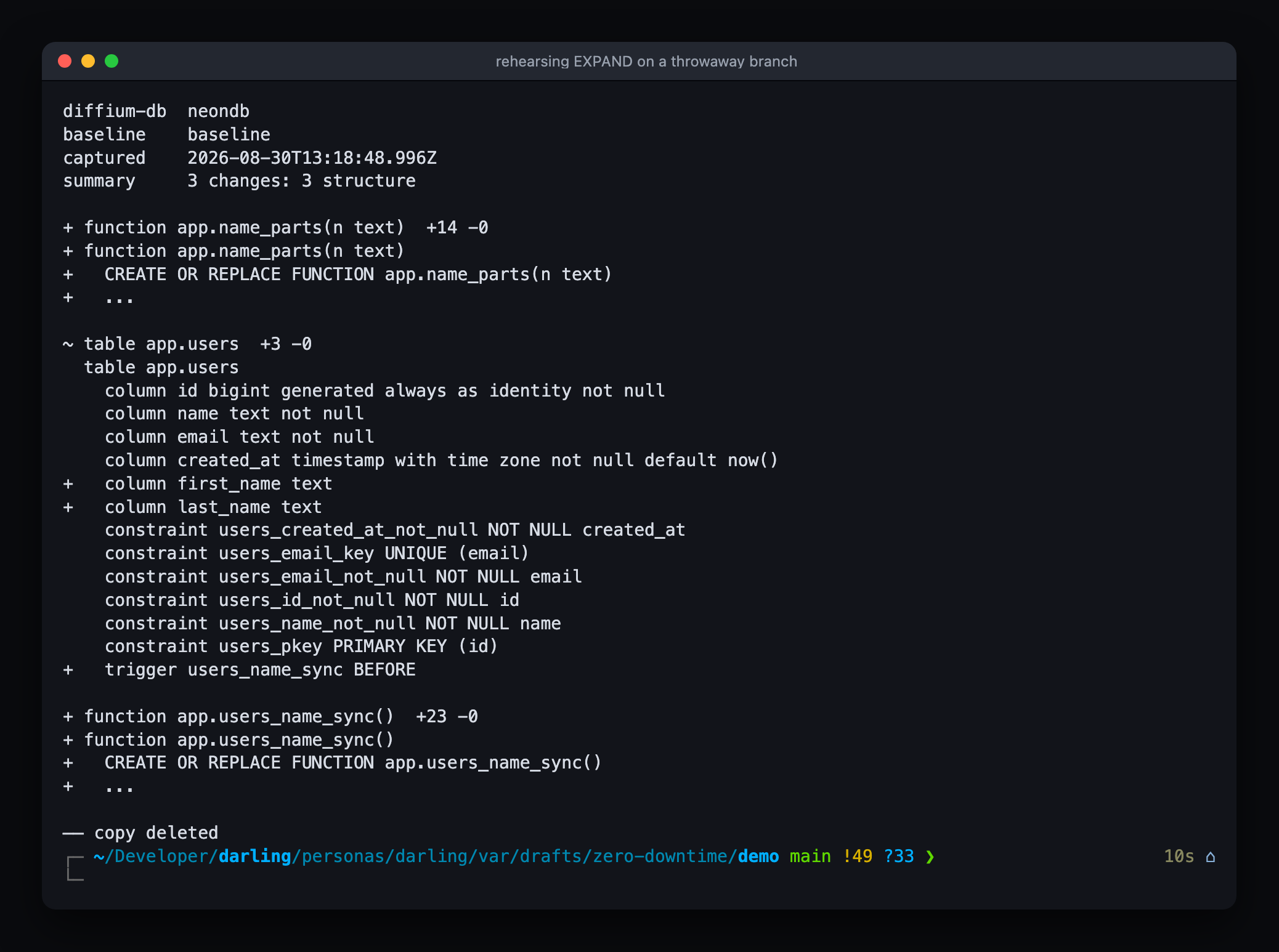
The expand phase, run on a copy. Two columns, a trigger, and a helper function. Nothing else.
Reading the diff is the point. psql told me the phase succeeded. It did not tell me what it did, and "what it did" is where a migration written by an agent surprises you. I got a list of three changes and no fourth one, on a database I was about to throw away.
1. Expand
Two nullable columns with no default, so Postgres writes catalogue rows and never touches the table itself. Table size does not enter into it.
begin;
set local lock_timeout = '2s';

alter table app.users add column first_name text;
alter table app.users add column last_name  text;
lock_timeout is the line people leave out. An ALTER TABLE that cannot get its lock waits, and while it waits it blocks every reader queued behind it. A migration that fails in two seconds is a migration you rerun. A migration that waits is an outage with a different name.
Then the trigger, which is the load-bearing part of the whole post:
create trigger users_name_sync
    before insert or update on app.users
    for each row execute function app.users_name_sync();
Whichever shape a writer filled in, the trigger derives the other one. Application code doing the same thing is not enough, because during the deploy in step 2 there is an instance still running that has never heard of first_name, and psql and agents are writers too. The sync belongs where every writer goes through it.
On production it was over inside a second. Here is the traffic across that moment.
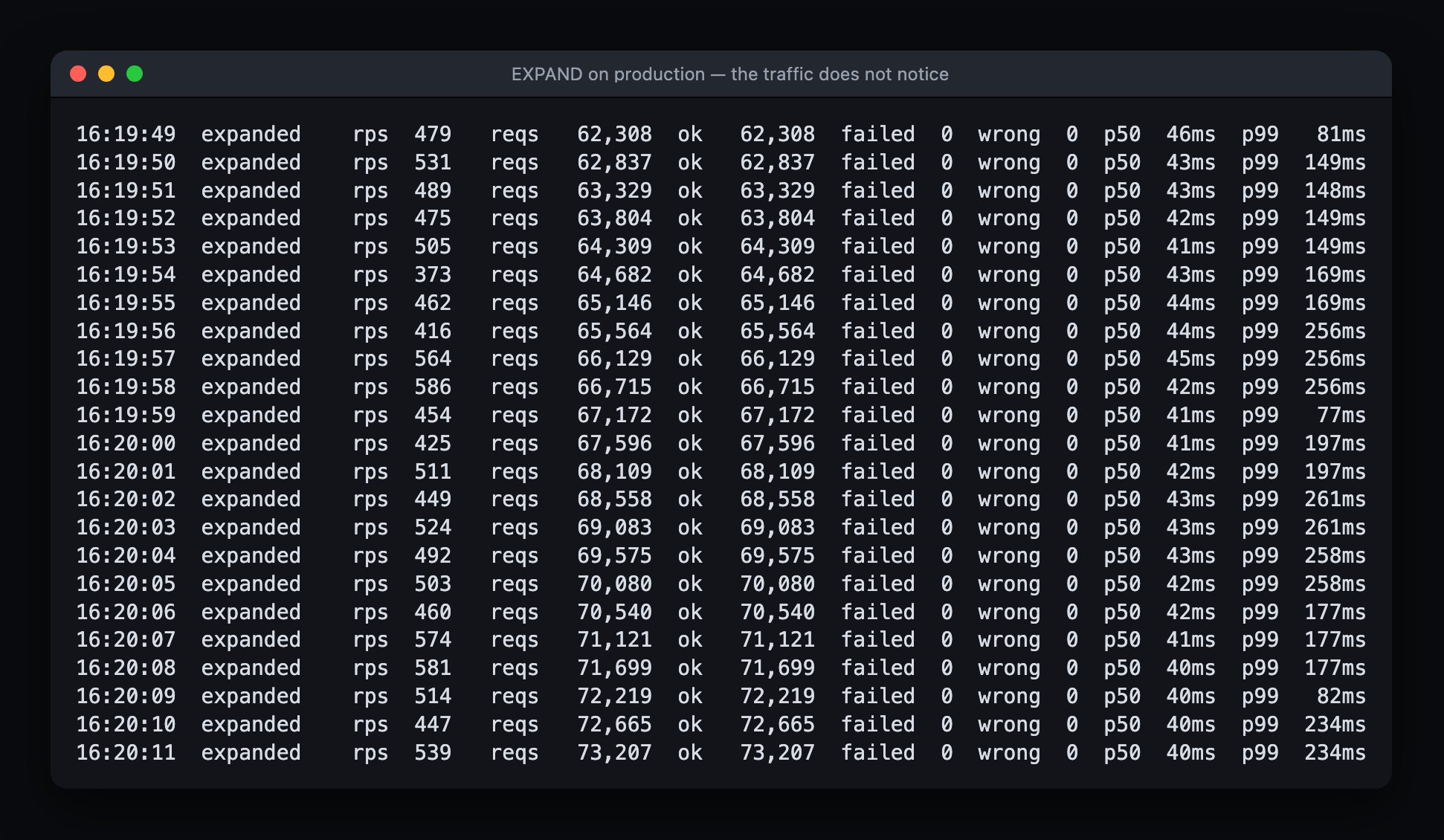
failed 0 on both sides of the DDL.
And the table afterwards: both columns exist, and 215,400 rows have nothing in them.
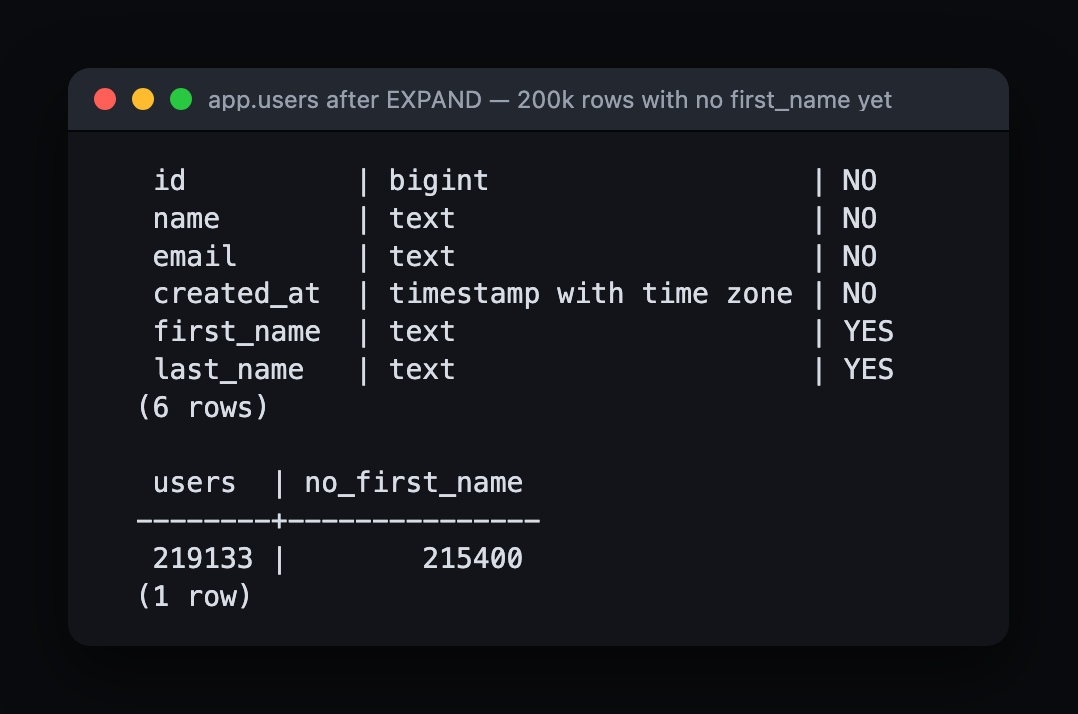
200,000 of those are the seed. The other 15,400 arrived from live traffic between the start of the run and the expand.
2. Deploy the dual write, and what that deploy costs
The app now writes name, first_name and last_name on every insert. It still reads name, so nothing about its answers changes. This deploy is invisible from outside, and it is the last moment where rolling back is free.
The deploy script replaces one instance, waits for it to answer, then replaces the other. My first version of it dropped 25 requests every time it ran, and the schema change had nothing to do with it.
The instance was exiting the moment it was told to. Requests already inside it died with it. The fix is three steps in a fixed order, and it is worth writing out because it is the actual mechanism behind the phrase "zero downtime":
draining = true;              // 1. start failing the health check
await Bun.sleep(600);         //    and let the proxy notice
server.stop(false);           // 2. close the listener
while (server.pendingRequests > 0) await Bun.sleep(10);   // 3. wait
That took it from 25 failures to 6. The remaining 6 were the new instance passing its health check while its connection pool was still cold, then queueing two hundred requests behind a TLS handshake until the runtime's 10 second request timeout killed them. Warming the pool before opening the port took it to 0.
I am including this because both bugs are in the deploy, not in the migration, and that is the general case. Expand and contract is a set of rules for making the schema safe to deploy through. It cannot save a deploy that drops connections on its own.
3. Backfill
Rows written since the expand already have both shapes. Everything older is still name-only, and that is 215,400 rows.
Not in one statement. A single UPDATE over all of them holds row locks for its entire life, gives you nothing to watch, and cannot be stopped halfway. Batches of 2,000, committing as they go, with a partial index so that finding the next batch stays cheap once the easy rows are gone:
create index concurrently if not exists users_backfill_idx
    on app.users (id) where first_name is null;
CONCURRENTLY keeps writes running while the index builds, and it cannot run inside a transaction, which is why this file is deliberately not one.
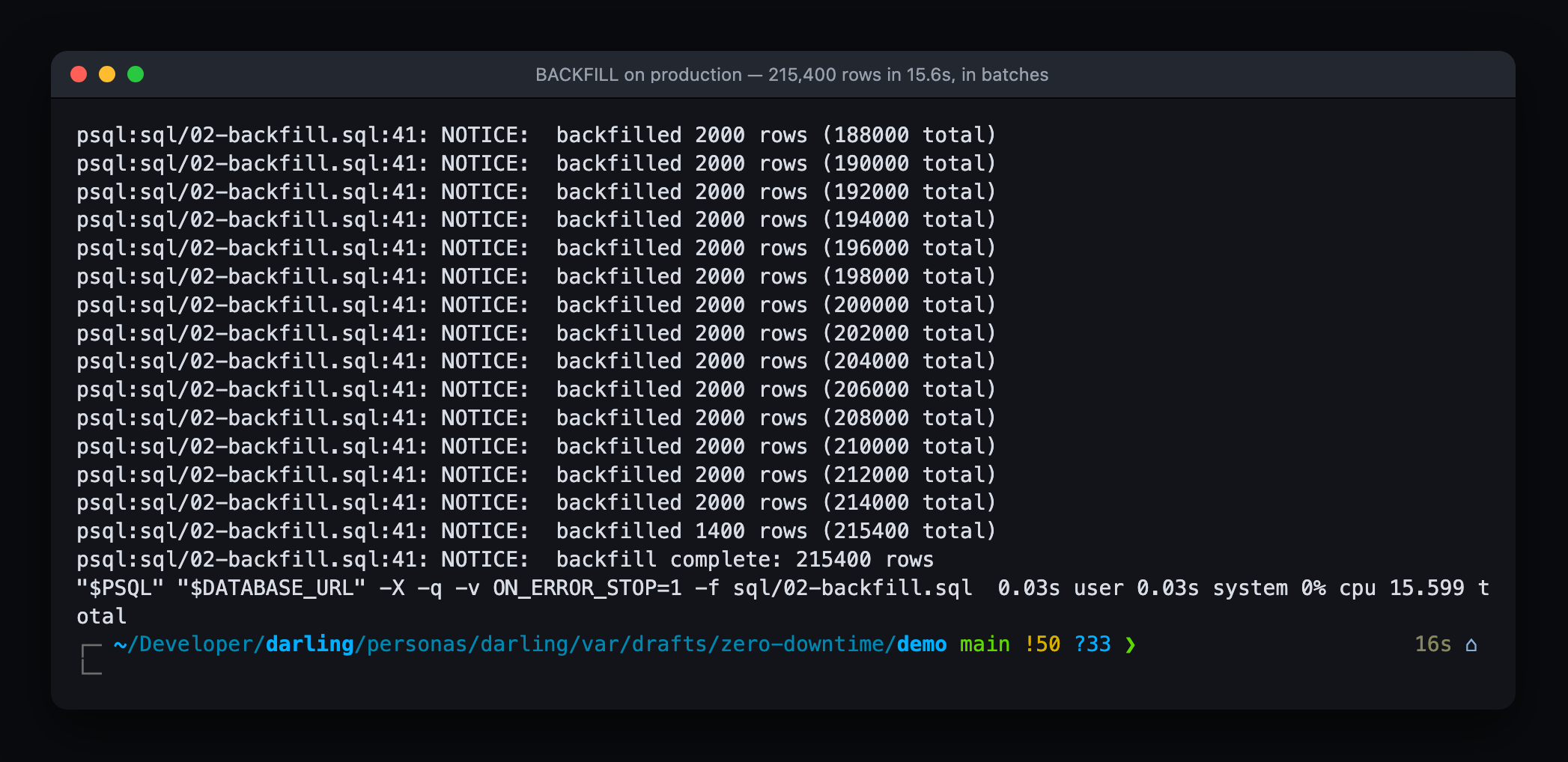
215,400 rows in 15.6 seconds, in batches of 2,000. Nothing failed while it ran.
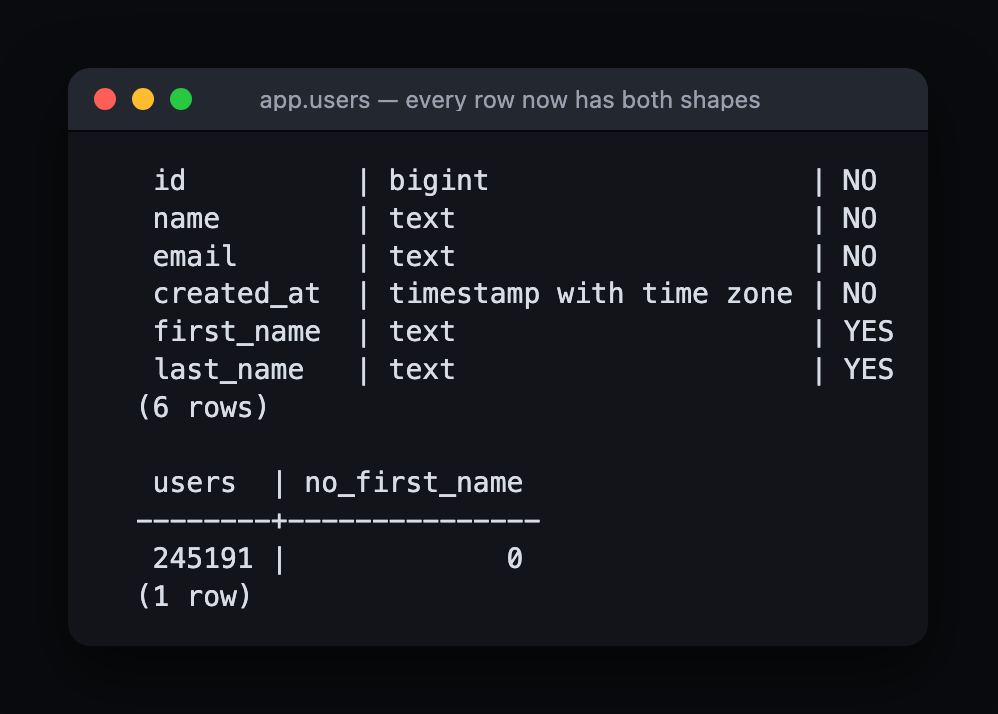
Nothing left to fill.
Before any of this, run the check that says whether the split is reversible at all:
select count(*) from app.users
 where btrim(name) is distinct from btrim(<the split, put back together>);
Zero means every name survives the round trip. Anything else means you have decided what happens to those rows, whether or not you know it yet. Mine was zero, which is a property of names I generated, not a property of names.
4 and 5. Constrain, then flip the reads
NOT VALID first, then validate. The first statement writes a catalogue row and takes the lock for that long. Every new and updated row is checked from that moment. The second statement reads the whole table under a weaker lock, and writes keep going while it runs.
alter table app.users
    add constraint users_first_name_present check (first_name is not null) not valid;

alter table app.users validate constraint users_first_name_present;
Then the app is deployed reading first_name and last_name, still writing both. This is the step that is safe only because step 3 finished. Flip the reads with rows still unbackfilled and half your users are suddenly called " ".
6. Contract
The rehearsal for this one is the one worth reading, because dropping a column is the step with no undo.
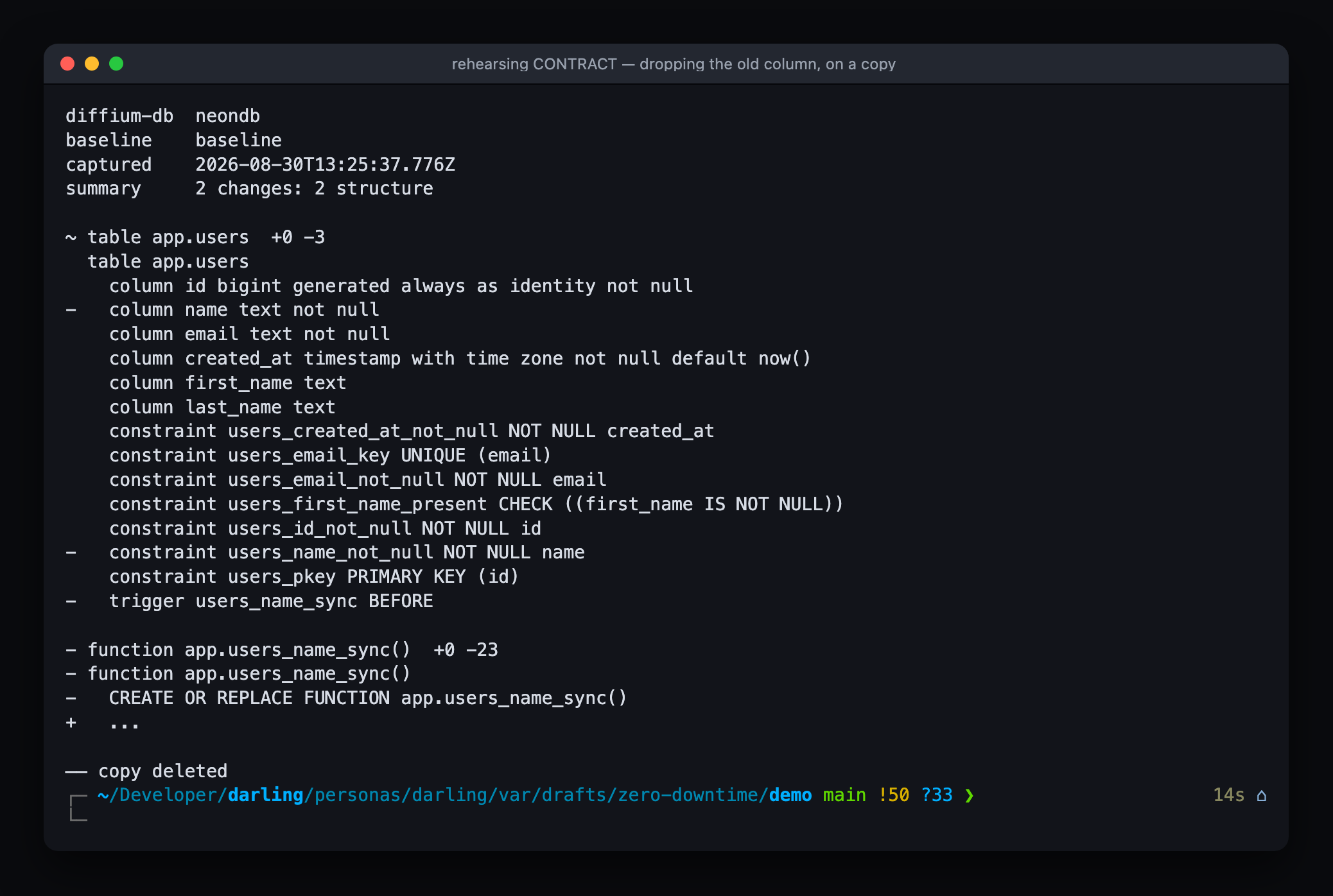
The column, the trigger, the function and the NOT NULL constraint that came with the column, all leaving together. On a copy.
The order is not negotiable. Deploy an app that never mentions name, confirm it is on every instance, and only then drop the column. Contract while one instance still references it and that instance starts returning 500s until someone restarts it.
begin;
set local lock_timeout = '2s';
drop trigger users_name_sync on app.users;
drop function app.users_name_sync();
alter table app.users drop column name;
commit;
0.81 seconds.
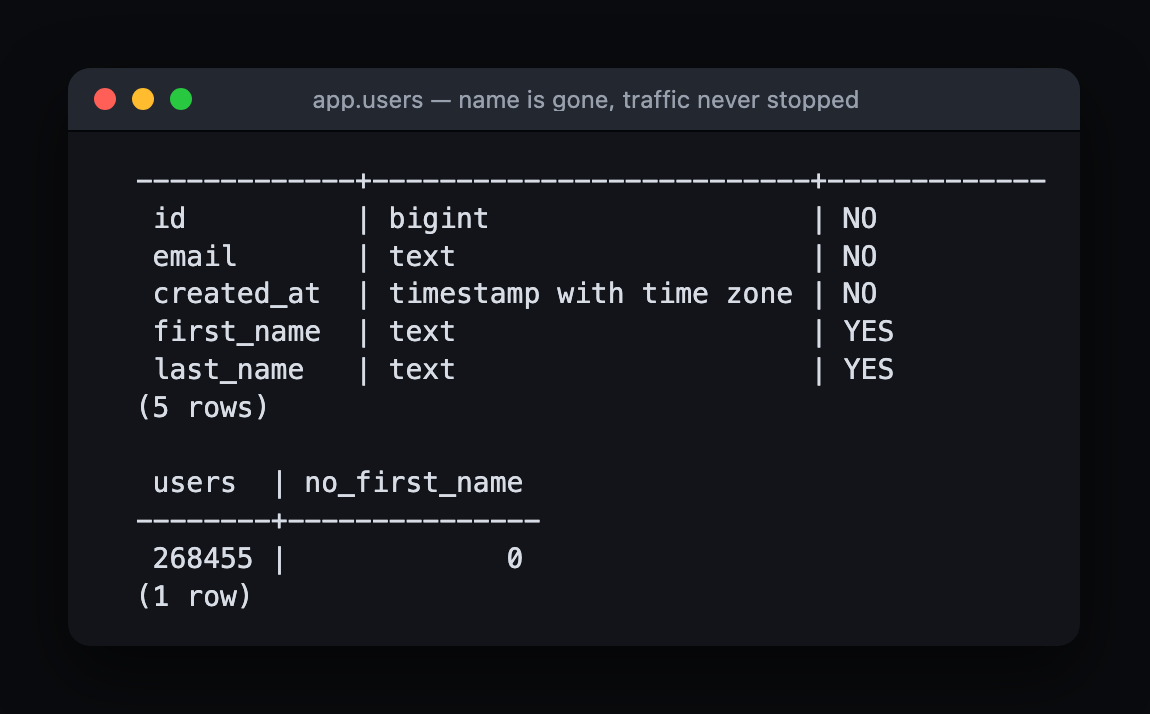
What the traffic saw
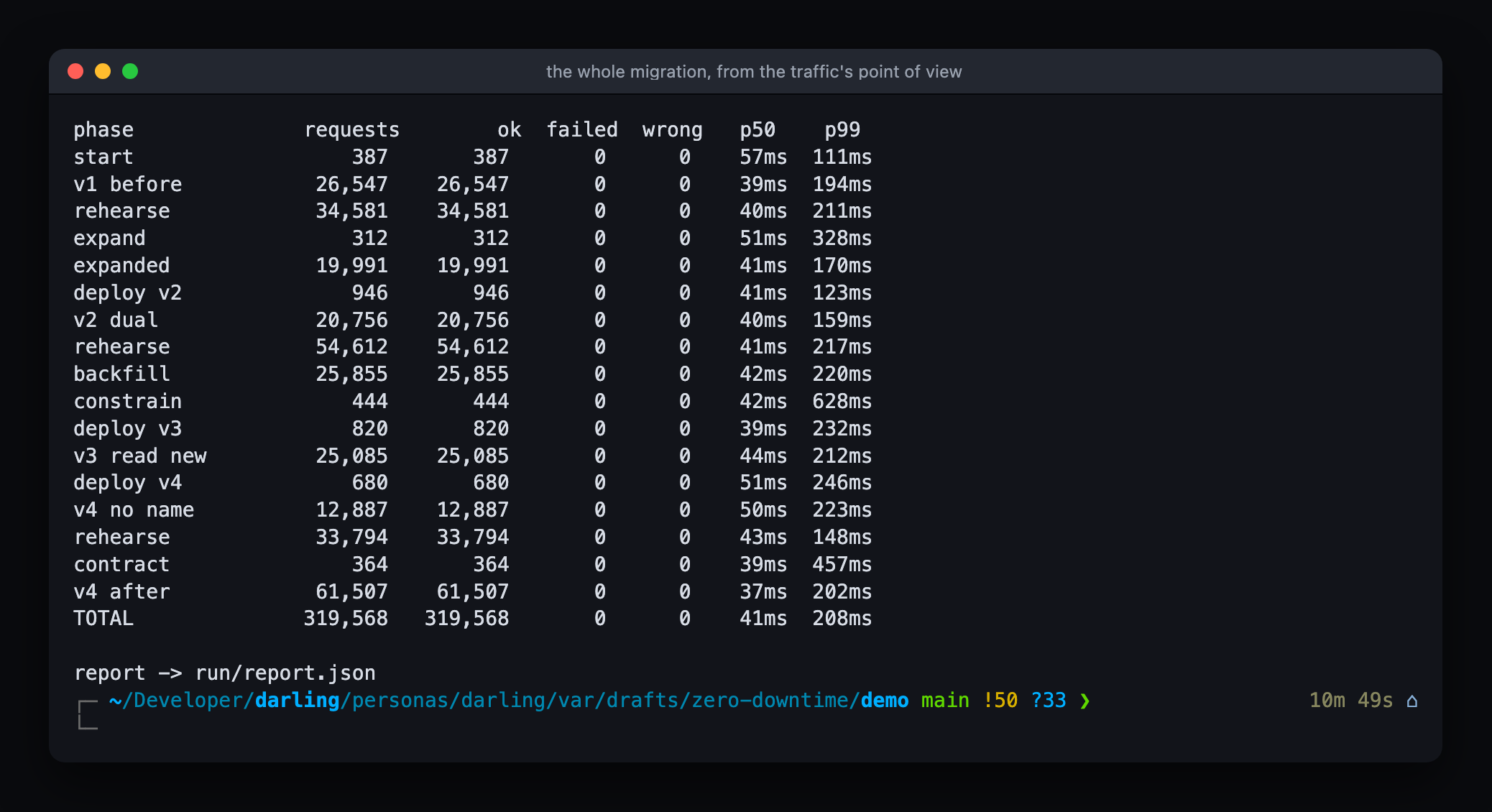
319,568 requests over 10 minutes 49 seconds. 0 failed, 0 with a wrong name, p50 41ms, p99 208ms. The migration is in there: two DDL phases, a 215,400 row backfill, a constraint validation and four rolling deploys, and none of it shows up as a change in the numbers.
The end state is 279,892 users, every one of them with a first and last name, and no name column.
What breaks it
Take out the trigger and everything above still passes its tests, right up until a rolling deploy has both versions live. Here is the whole failure in six lines:
create table control.users (id bigint generated always as identity primary key,
                            name text, first_name text, last_name text);

-- old instance, still running, writes the only column it knows about
insert into control.users (name) values ('Ada Lovelace');

-- new instance, just deployed, reads the new columns
select coalesce(first_name,'') || ' ' || coalesce(last_name,'') as api_returns
  from control.users;

 api_returns
-------------

(1 row)
The value is one space. Status 200. Correct content type. Ada's name is gone. This is the failure the whole pattern is arranged around, and it is invisible to anything that only counts error rates, which is why the load generator in this demo compares the name it wrote against the name it read.
Building it yourself
The demo is three TypeScript files, six shell scripts and seven SQL files, and everything in it that matters is quoted somewhere above.
The API is one file. APP_VERSION picks its storage layer, so the four deploys are four values of an environment variable instead of four commits:
v1  name is the only column there is
v2  writes both shapes, still reads name
v3  reads first_name / last_name, still writes both
v4  never mentions name. only now can the column go
In front of it, a proxy routes to whichever of the two instances passes its health check. Beside it, the load generator from the top of the post. The rest is a script per job. Start the two instances and the proxy. Roll a version out in the drain order above. Rehearse a phase on a branch. Print the columns and the null count once a second.
The SQL is the schema, the seed, the losslessness check, and one file per database phase.
Set the database up, and run the check before anything else. It has to come back 0.
psql "$DATABASE_URL" -f sql/00-schema.sql -f sql/00-seed.sql
psql "$DATABASE_URL" -f sql/check.sql
Then three panes. Traffic in the first, the database in the second, the steps in the third:
./bin/up.sh v1
bun src/load.ts            # pane 1, leave it running
./bin/watch-db.sh          # pane 2

./bin/rehearse.sh 01-expand.sql
psql "$DATABASE_URL" -v ON_ERROR_STOP=1 -f sql/01-expand.sql
./bin/deploy.sh v2

./bin/rehearse.sh 02-backfill.sql
psql "$DATABASE_URL" -v ON_ERROR_STOP=1 -f sql/02-backfill.sql
psql "$DATABASE_URL" -v ON_ERROR_STOP=1 -f sql/03-constrain.sql

./bin/deploy.sh v3
./bin/deploy.sh v4

./bin/rehearse.sh 04-contract.sql
psql "$DATABASE_URL" -v ON_ERROR_STOP=1 -f sql/04-contract.sql
Three environment variables and that is the whole configuration. DATABASE_URL for whichever branch you are treating as production, NEON_PROJECT_ID so the rehearsal knows where to cut, and a diffium-db checkout so it can read what came back.
Any Postgres works for the app itself. Branching is what makes rehearsing every phase cheap enough that you do it every time instead of only when the change looks scary.