
Mini Shai-Hulud: Recreated
Practical exploration (and recreation) of the `Mini Shai-Hulud` supply chain attack.

It feels like the internet is on fire lately. Every couple of days (if not every single day…) there is a new supply chain attack. And while it is a fact we can’t predict what software is going to get hit, we can (and need) to familiarize ourselves with how these exploits work. Not only because exploits are, well… fascinating, but also because they all share something in common — they are all just engineering concepts, executed in combination. Knowing more concepts, understanding how technology truly works, puts us a few steps closer to not making the mistakes that allow those exploits to happen. And this is exactly what this article is about. It explores how the Mini Shai-Hulud works, practically, with real repositories that recreate it.
Resources:
You can open these in separate tabs and explore them as the practical part of this post arrives a little further down.
How it works
I think this exploit is not complex. It is definitely clever, but not complex. It is a combination of platform engineering, web development, and in parts - networking knowledge. All this exploit relies on, is carelessness in automation and lack of guardrailing in the JavaScript ecosystem. Here’s how it works.
Privilege Scopes
An attacker targets repositories which have Github Workflows that run on every new Pull Request. This (triggering a workflow on Pull Request status changes) is permitted by either the pull_request_target, or pull_request events. The difference between the two, is that pull_request_target runs in the context of the base branch of the repository, while the pull_request one runs in the context of the commit. As the context of this paragraph already suggests, the culprit is pull_request_target.
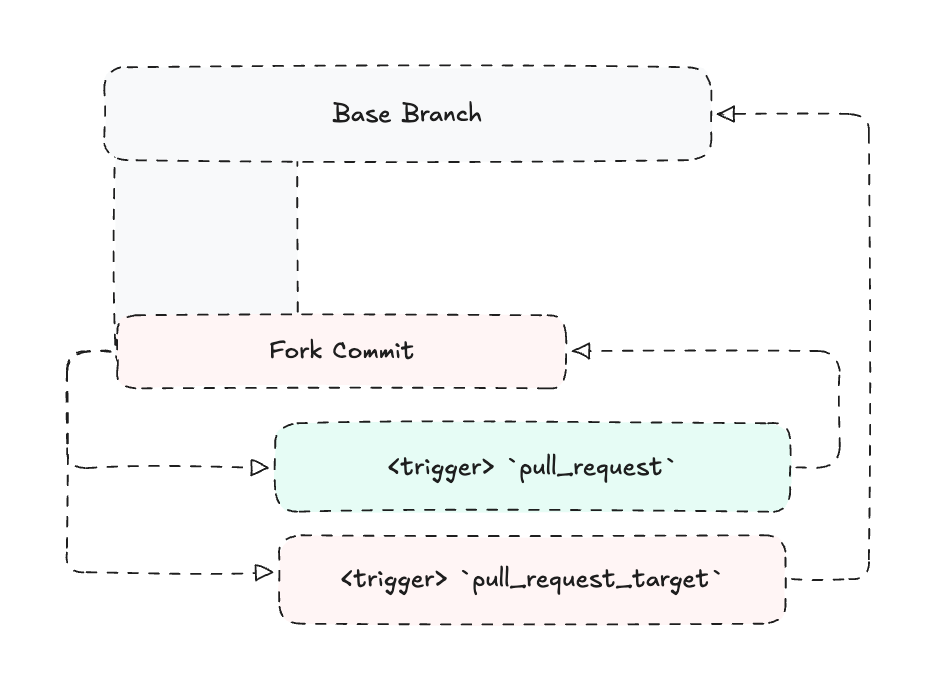
Now. I’d like to make a point that pull_request_target is not inherently the issue here. The issue comes when you allow “samples” from a workflow that was triggered automatically on pull_request_target, to escape the “sandbox” context that the Pull Request has. In the case of Mini Shai-Hulud, this happened because of a cache step. In other words, cache poisoning.
Cache Poisoning
The vulnerable repository would run a pull_request_target workflow on every new Pull Request, which would then run the fork-updated code (that would poison a shared .pnpm store), and cache the build through GitHub’s actions/cache. This poisoned cache would later get restored from a trusted release flow, and... put the exploit in action.
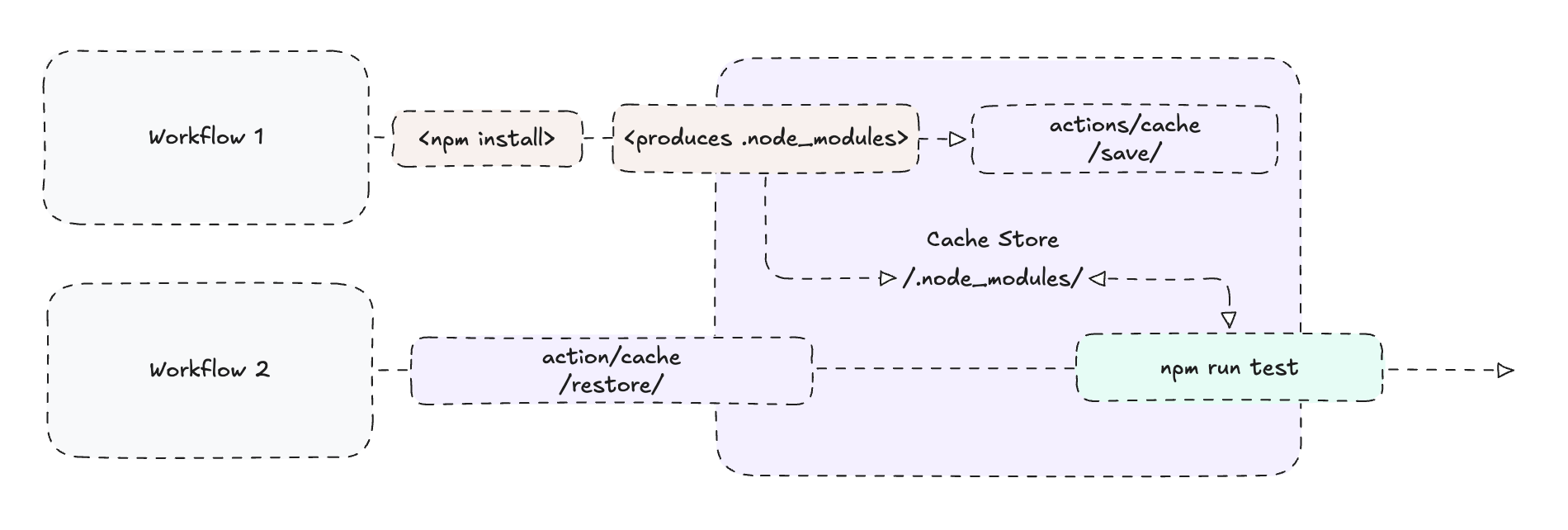
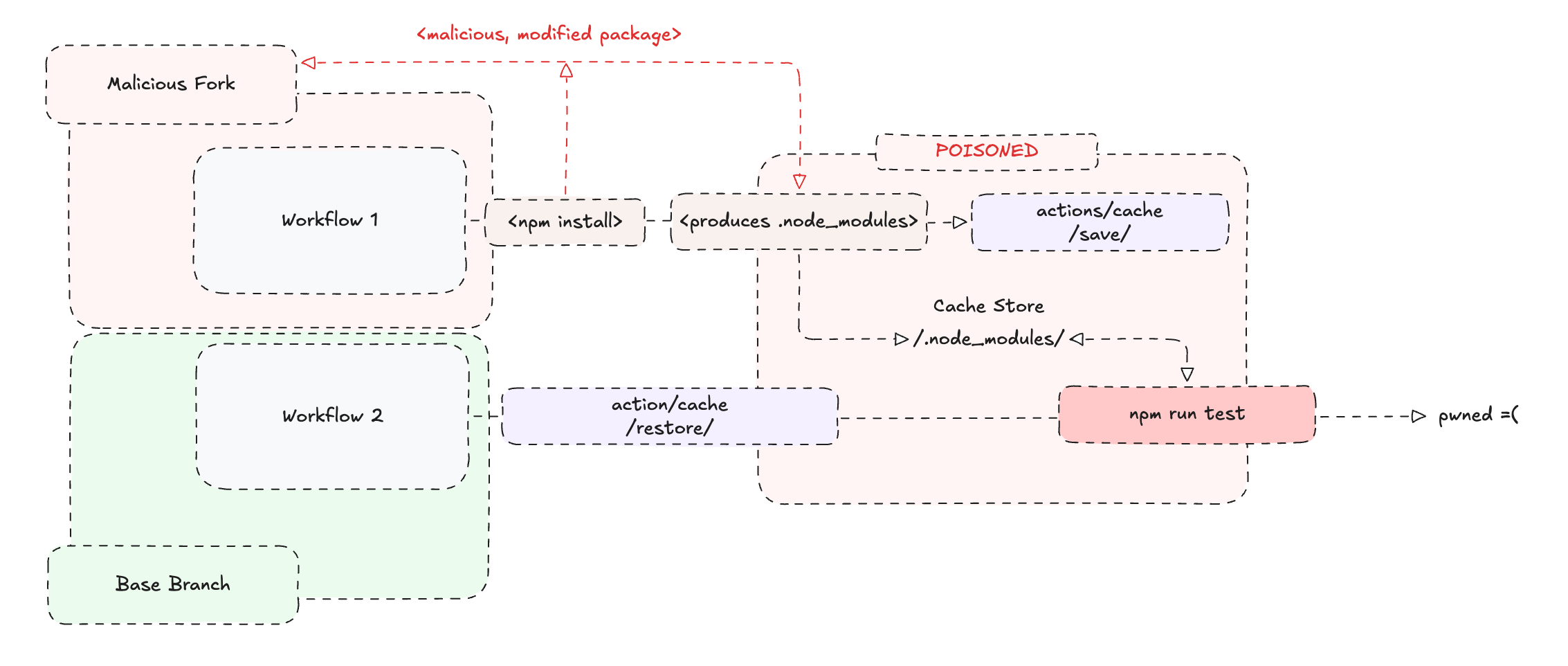
The cache pass itself is not the issue here. The issue is that a workflow that is allowed to write to the cache registry, is also allowed to execute forked code… In a different world, the saved cache would only be allowed to be restored from inside the Pull Request context, while the release workflow would rebuild its dependencies from scratch (or only access cache from trusted branches, preferably with not computed names).
Recreating the exploit
In this practical example, this is exactly what happens:
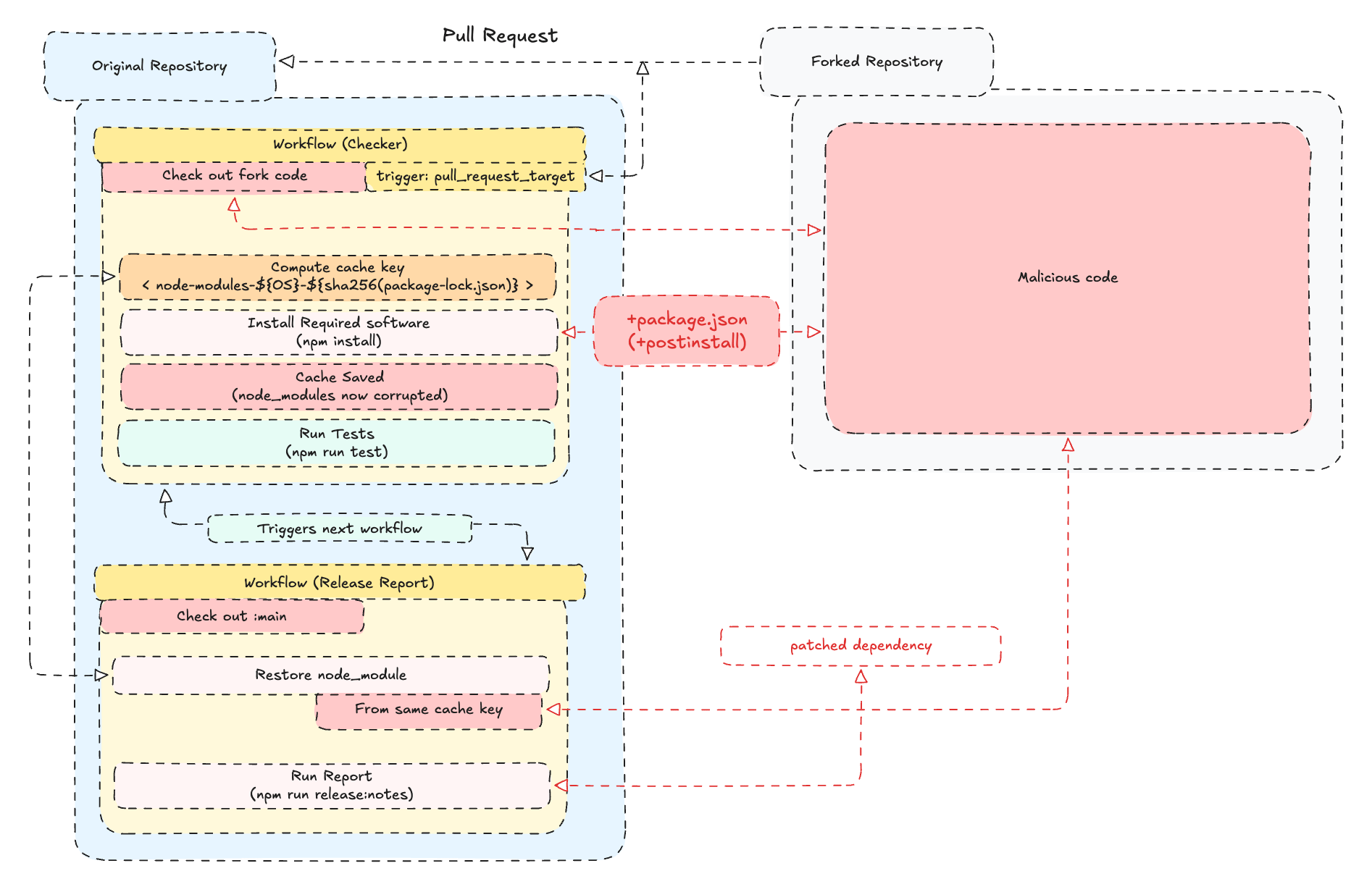
In the original repository (github.com/kubeden/shai-hulud-poc), there is a workflow named “PR Quality Report” serving as a standard QA / testing automation that runs tests and produces a report. This workflow has the pull_request_target trigger and runs on every new Pull Request opened against the repository.
When the “PR Quality Report” workflow completes successfully, it triggers another workflow named “Release Report” that uploads the test report as an artifact.
Both workflows make use of caching, where the first workflow computes a cache key, and the second workflow restores this cache key. Since the first workflow that runs on every new Pull Request has the pull_request_target trigger, the cache key it generates with actions/cache lives inside the base branch context scope and not in the fork commit scope, which is exactly why restoring it from the release workflow is allowed (and why the Mini Shai-Hulud exploit happened).
Restoring the cache key from the second (and privileged) workflow also restores a modified npm package (left-pad). The modified npm package is included in the test script of the second workflow, thus being executed in its modified variant. For the sake of this demo, the modified left-pad package (which is being checked out in the main branch and since the workflow has contents: write set), is allowed to commit a file called “hehe.txt” in it (the main branch).
You can imagine what being able to commit a file directly into main can do to an entire repository… :)
Takeaway
Software Engineering is a wide landscape of concepts upon concepts upon concepts. While it is obviously impossible to remember them all, a valid and necessary aspiration would be to be able to understand. In the beginning of this post I wrote this exploit is not complex, but now that I think deeper—it is, as it requires one to know:
what caching is
what automation pipelines are & how they work
permission scopes & privilige control
web development & package managers (npm, pnpm, the package.json)
code store (git)
And probably more… the point is: it. requires. knowledge. And knowledge… costs $99/month and its names are Claude Code and Codex.
I think we will continue seeing large scale attacks. I also think it will become harder and harder to defend against these attacks unless we either manage to keep ourselves in check and apply strong precautions against doing without understanding, or… accompany our software development with something like an AI-powered “antivirus” software. In fact, one of my theories about why the recent supply chain attacks happen, is that the AI labs are funding groups / paying maintainers to get hacked, so they could sell us exactly that — an “AI-powered antivirus software”. Who knows… maybe that’s why OpenAI released their “cyber” program and Anthropic has been doing the biggest media push they’ve done to date with Mythos. Anyway… you get the point: make them scared, then promise them peace but only if they pay. Which in other words, is also called racketeering — a tactic, well perfected by mobs & gangs worldwide.
Thank you for reading.