
Bypassing Apple's 20% store cut (with Stripe & RevenueCat)
I make an iOS app, but I am concerned non-iOS users might want to engage with the idea so I find a way to allow web payments with Stripe & bind them to a RevenueCat entitlement. Apple accepts it.

I made my first iOS app. While, yes, I could write about my experience using Expo, and why I think it is a great platform, this post is not about this. It is about a little technical feat I achieved, which I am proud of, and which I think can come in handy to a lot of people — precisely, one that “allows” an iOS app to accept web payments, a concept Apple is famously not supportive of.
The Problem
It is well-known that Apple is hostile against developers who attempt to bypass their store. If they can’t get a cut from your payday, you are not allowed in there. Understandably developers are unhappy with this, but they comply.
Not Epic Games, though… [Epic Games vs Apple — Lawsuit]
Me personally, I didn’t think about the cut. After all, I don’t have nearly as many users for it to make a difference for me. What I was concerned about, though, is that non-Apple users might want to be a part of my app. You see, my app is perfect to send to a friend and make fun of them (for being bald). For the joke to work, one has to pay $1.99.
Solution & Architecture
After a short back-and-forth with my terminal agent, combined with my 7 years in DevOps, I came up with quite a satisfying solution that can be summarized in two words: “License Keys”.
I will divide the solution in three separate groups:
1/ iOS: RevenueCat
2/ Web: Stripe
3/ The bridge: Stripe + RevenueCat.
Before I start, below are the solution architecture as well as the database schema. Take a look at them, because reading the rest of the post will gradually make more sense.
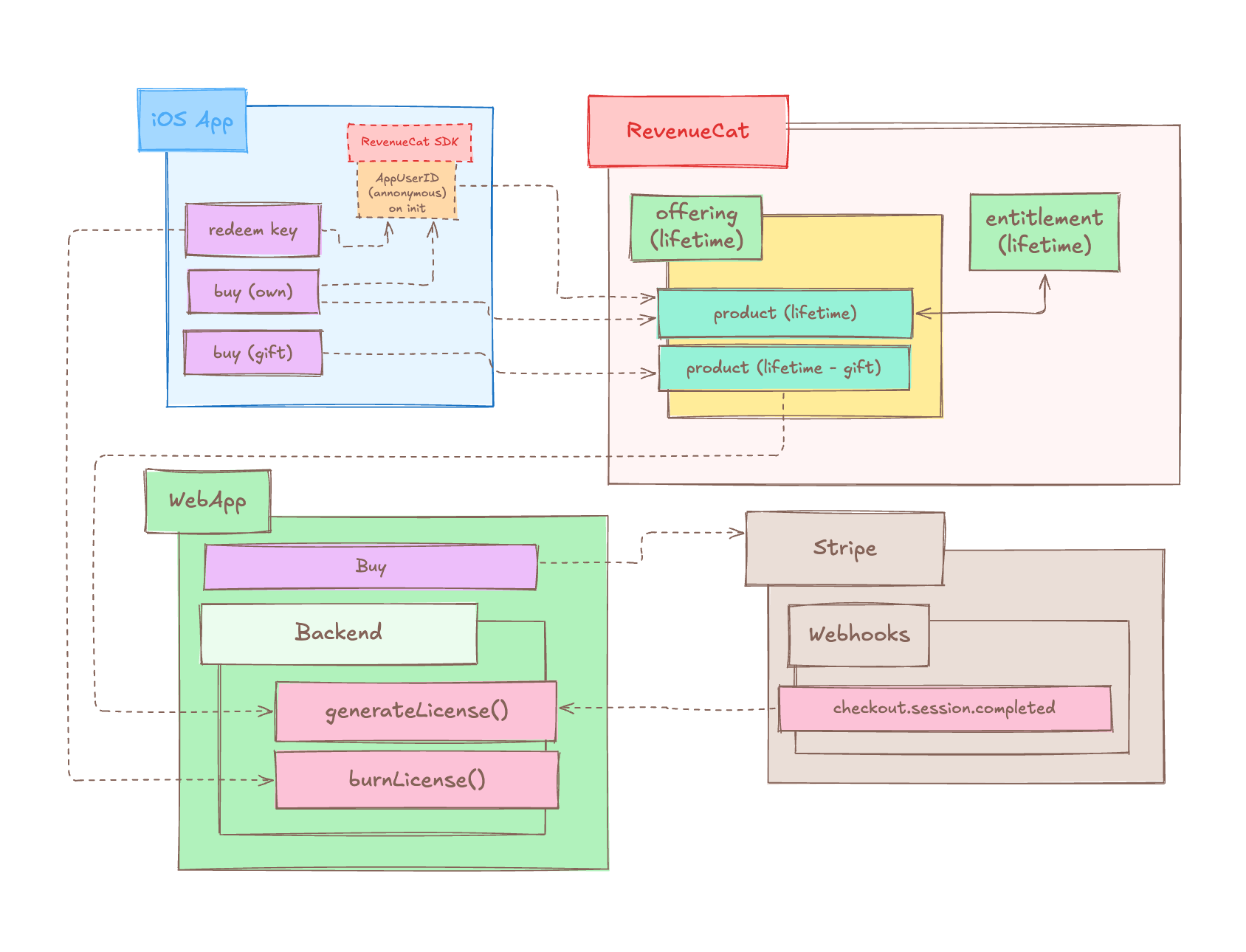
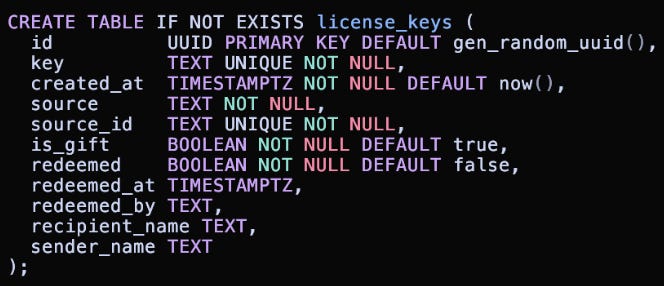
iOS (RevenueCat)
RevenueCat’s biggest value prop is that it becomes easy for a developer to interact with the Apple Payments system by not dealing with it at all. This happens because of three variables:
Products: A single logical “unit” a user buys
Entitlements: The access a user receives when they buy a product
Offerings: The combination of one or more products
I like to think about these as the products being the items I can buy in a market, entitlements as to what I’m able to do with my items, and the offerings being the shelves those items are placed on.
For my app specifically, I have the following set-up:
Products:
Lifetime: A normal $1.99 in-app purchase
This is for the person buying my app on iOS
Lifetime (Gift): A separate $1.99 in-app purchase
This does not unlock anything for the buyer but rather makes a request to my backend, where a one-time license (gift) key is being generated
Entitlements:
Lifetime: The logical element that unlocks the full app
Offerings:
Lifetime: The logical group that “keeps” the products (lifetime & lifetime-gift)
With this, my app has two buy flows: 1) own purchase, 2) gift ; and one redeem flow:
Own purchase: the user buys
Lifetimefor themselves through Apple.Gift purchase: the user buys
Lifetime (Gift)and my backend generates a one-time gift key/
/Gift redemption: someone else enters that gift key
/ and my backend grants them the lifetime entitlement/
In short, the app only cares about and unlocks under one condition:
customerInfo.entitlements.active[”Lifetime”] !== undefined
Web (Stripe)
The web flow is quite simple. I have a /gift endpoint on my website that upon a successful payment with Stripe, triggers a webhook that:
generates a license (gift) key and records it into the database
generates a personal link for the user to send to whoever they bought it for
emails the gift key to the buyer (so they don’t lose it)
I am not sure I have to say this, but just in case, webhooks are awesome because they allow your app to execute actions based on specific events as “checkout.session.completed” which only happens upon a successful payment.
The Bridge
The bridge uses a combination of what I previously explained in the Stripe & RevenueCat sections. In my app, there is a button “Have a license key?” on the paywall, which when clicked, reveals an input box where the user can input their license (gift) key. When they do, the following happens:
My app gets the current RevenueCat App User ID
My app sends the license (gift) key + App User ID to my backend
My backend validates and burns the key
My backend calls RevenueCat and grants the
Lifetimeentitlement to the App User IDThe customerInfo refreshes and the app unlocks for the user
CURIOUS: This was very hard for me to comprehend, but RevenueCat creates an Anonymous App User ID for every user that has reached the view/stage/whatever, where your code “initializes” the RevenueCat SDK... although I would expect this to only happen upon an action from a user.
The complete Stripe + RevenueCat flow looks like this:
User 1 buys a gift from the website
Stripe webhook triggers → a new license (gift) key is generated
User 2 receives the message & downloads the app
User 2 reaches the Paywall page
RevenueCat creates an App User ID for User 2
User 2 enters the “Bridge” flow
TIP: take a look at the architecture diagram again.
And this concludes the bridge section.
Closing Notes
Creating my first iOS app was an enjoyable experience. I love Expo and I love the fact they make it so easy for anyone to build an application. React Native too — great technology. Before I started building it, I was hesitant exactly because of every other iOS developer’s public opinion on Apple and their “harsh rules”. I didn’t find their rules all that harsh. My app only got refused one, and the refusal reason was valid (parts of my UI were not reachable).
The true satisfaction I got from my application, though, is this post, actually. Not for another reason, but for one that I caught on to just a few hours ago. My implementation.
You see, my implementation has a weakness — right now, every user that gets BaldCheck! gifted to them, can only use it as long as they don’t re-install the application. This happens because RevenueCat creates an Anonymous App User ID, which can not be sufficiently mapped back to the user that redeemed the key.
Not only, but for the app to be officially bound to the user’s AppleID, they’d have to go through an official StoreKit / Apple offer code flow… which wouldn’t allow my personally-generated gift keys /bald-abc123xxx…/ .
It’s okay, though. A few users got BaldCheck! gifted to them and they redeem their key, which did IN FACT, give them access to the application. There is a support email available, so in the unfortunate case where they uninstall the application, they can still regain access to it through me.
But it makes me think… can I truly bypass Apple’s 20% store cut. I think so..? Maybe it’ll work if I map one of my keys bald-abc123xxx to an Apple offer code? I am yet to find out. They’ll probably not accept this… we’ll see.
Hey! Thank you for reading. This post was quite enjoyable for me to write — from building the app, to writing about it, to… eventually… understanding what I built, heh.
Listen, if you are reading this and you are feeling imposter syndrome, or that it is too late to get into tech (software, whatever), I need you to know you couldn’t be more wrong. Today is the best day EVER in our lives to get into tech because of… you guessed it, AI.
It is so incredibly easy to learn and do nowadays, that many are still unable to process this new reality. But it is here. And it truly is the best time to get into tech. So, if you are passionate about it, and if you find yourself smiling right now, believe me… just get out there and start doing.
When you do, write. While you write, discuss. And when you’re done, you’ll find yourself wanting to re-do it all. So do, until you’ve reached a state you’re satisfied with.
That’s all,
Dennis
After-post notes
N1: All my posts are written by me.
N2: I am free-flow contracting right now, so if you liked what you read, feel free to reach out to me on my email ; I am open to roles that would allow me to be creative through engineering. I would also have to relate to what you’re building.
You can find everything about me on denislavgavrilov.com/about
Thank you for reading and have a good one!